
We’re now ready to assemble the code for a Perceptron class. The only data the perceptron needs to track are the input weights, and we could use an array of floats to store these.
https://natureofcode.com/book/chapter-10-neural-networks/
SetLength(weights, n);
  for i:= 0 to high(weights) do
    weights[i]:= RandomF * 2 - 1;

  for i:= 0 to High(Training) do begin
    x:= Trunc(RandomF() * form1.ClientWidth);
    y:= Trunc(RandomF() * form1.ClientHeight);
    //writeln(itoa(y))
     if y < f(x) then banswer:= 0;
     if y >= f(x) then banswer:= 1;
A perceptron needs to be able to receive inputs and generate an output. We can package these requirements into a function called FeedForward().
//function TForm1FeedForward(inputs: Tarray<double>): integer;
function FeedForward(inputs: Tarraydouble): integer;
var sum: double;
    i: Integer;
begin
  Assert(length(inputs)=length(weights), 'weights and input length mismatch');
  sum:= 0;
  for i:= 0 to high(weights) do
    sum:= sum + inputs[i] * weights[i];
  result:= activateFn(sum);
end;
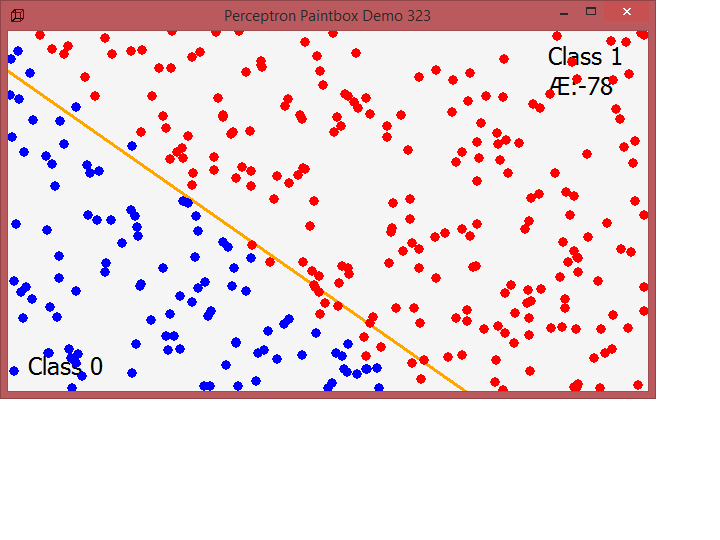
Presumably, we could now create a Perceptron object and ask it to make a guess for any given point.
procedure Train(inputs: Tarraydouble; desired: integer);
var guess, i: Integer;
    error: Double;
begin
  guess:= FeedForward(inputs);
  error:= desired - guess;
  errorsum:= errorsum- error;
  for i:= 0 to length(weights) - 1 do
    weights[i]:= weights[i] + c * error * inputs[i];
end;
With this method, the network is provided with inputs for which there is a known answer. This way the network can find out if it has made a correct guess. If it’s incorrect, the network can learn from its mistake and adjust its weights. The process is as follows:
- Provide the perceptron with inputs for which there is a known answer.
- Ask the perceptron to guess an answer.
- Compute the error. (Did it get the answer right or wrong?)
- Adjust all the weights according to the error.
- Return to Step 1 and repeat!
float c = 0.01;

Step 1: Provide the inputs and known answer. These are passed in as arguments to train().

void train(float[] inputs, int desired) {

Step 2: Guess according to those inputs.

  int guess = feedforward(inputs);

Step 3: Compute the error (difference between answer and guess).

  float error = desired - guess;

Step 4: Adjust all the weights according to the error and learning constant.

  for (int i = 0; i < weights.length; i++) {
    weights[i] += c * error * inputs[i];
  }

}
To train the perceptron, we need a set of inputs with a known answer. We could package this up in a class like so and paint them:
function TTrainerCreate(x, y: Double; a: Integer): TTrainer;
begin
  trainer.inputs:= [x, y, 1];      //1 is the bias and has also a weight!
  trainer.answer:= a;
  //writeln(itoa(trainer.answer))
  result:= trainer;
end;

function f(x: double): double;
begin
  Result:= (x) * 0.7 + 40;
end;

function activateFn(s: double): integer;
begin
  if (s > 0) then
    Result:= 1
  else Result:= -1;
end;

procedure TForm1FormPaint(Sender: TObject);
var
  i, x, y, guess: Integer;
  bol: byte;
  tmpBmp: TBitmap32;
  //tmpBL: TBitmapLayer;
begin
  with form1.Canvas do begin
    Brush.Color:= {Tcolors.}{clgreen;} clwebwhitesmoke; //Whitesmoke;
    FillRect(ClipRect);
    x:= form1.ClientWidth;
    y:= Trunc(f(x));
    Pen.Width:= 3;
    pen.Color:= clwebOrange;
    Pen.Style:= {TPenStyle.}psSolid;

    MoveTo(0, Trunc(f(0)));
    LineTo(x, y);

    //writeln('Train start '+DateTimeToInternetStr(now, true))
    Train(training[count].inputs, training[count].answer);
    //writeln('Train end '+DateTimeToInternetStr(now, true))

    count:= (count+ 1) mod length(training); //for animation one point at a time
    form1.caption:= 'Perceptron Paintbox Demo'+' '+itoa(count);
    Pen.Width:= 1;
    pen.Color:= clwebblack; //TColors.Black;
    Font.Size:= 18;
    Textout(20,320,'Class 0');
    Textout(540,10,'Class 1');
    Textout(540,40,'Æ:'+floattostr(errorsum))
    for i:= 0 to count do begin
      guess:= FeedForward(training[i].inputs);
      x:= trunc(training[i].inputs[0]-5);
      y:= trunc(training[i].inputs[1]-5);
      //MoveTo(x, Trunc(f(x)));
      //LineTo(x+9, y+9);
      //Brush.Style:= {TBrushStyle.}bsSolid;
      Pen.Style:= {TPenStyle.}psClear;
      if guess > 0 then bol:= 1;
      if guess <= 0 then bol:= 0;
      //Brush.Color := DotColor[guess > 0];
      Brush.Color := DotColor[bol];
      Ellipse1(rect(x, y, x + 11, y + 11));
    end;   //*)
    //writeln('debug count after paint slice '+itoa(count))
  end;
end;
At the end the whole code of perceptron_form2:
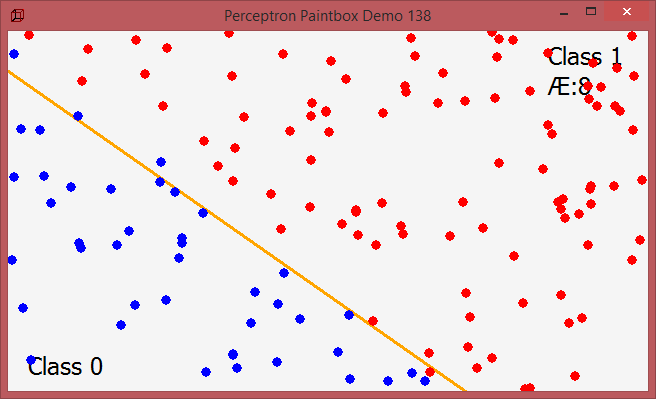

program perceptron_form2;

//http://www.rosettacode.org/wiki/Perceptron
{Task:  adapt to maXbox : no generics and no boolean masks

The website The Nature of Code demonstrates a perceptron by making it perform a very simple task : determine if a randomly chosen point (x, y) is above or below a line:  y = mx + b
https://natureofcode.com/book/chapter-10-neural-networks/   }

//interface
{uses
  System.SysUtils, System.Classes, Vcl.Graphics, Vcl.Forms, Vcl.ExtCtrls,
  System.UITypes; }

type
  TArrayDouble = array of double;

  TTrainer = record
    inputs: TArrayDouble; //TArray<Double>;
    answer: Integer;    //labels
    //constructor Create(x, y: Double; a: Integer);
  end;

  TArrayTrainer = array of TTrainer;

  function TTrainerCreate(x, y: Double; a: Integer): TTrainer; forward;

  type TForm1 = TForm;   //@class schema
   var tmr1: TTimer;
    procedure TForm1FormCreate(Sender: TObject); forward;
    procedure TForm1FormPaint(Sender: TObject); forward;
    procedure TForm1tmr1Timer(Sender: TObject); forward;
  //private
    procedure Perceptron(n: Integer); forward;
    function FeedForward(inputs: Tarraydouble): integer; forward;
    procedure Train(inputs: TArraydouble; desired: integer); forward;

var
  Form1: TForm1;
  training: TArrayTrainer; //TArray<TTrainer>;
  trainer:  TTrainer;
  weights: TArrayDouble;   //TArray<Double>;
  c, errorsum: double; // = 0.00001;
  count: Integer; // = 0;
  //const
  DotColor: array[0..1] of TColor; //= (clRed, clBlue);
  answers: array[0..1] of integer; // = (-1, 1);

//implementation
//{$R *.dfm}

procedure initPerceptron;
 begin
    c:= 0.00001;      //learn rate
    count:= 0; errorsum:= 0;
    DotColor[0]:= clRed; DotColor[1]:= clBlue;
    answers[0]:= -1; answers[1]:= 1;
 end;

{ TTrainer }
function TTrainerCreate(x, y: Double; a: Integer): TTrainer;
begin
  trainer.inputs:= [x, y, 1];      //1 is the bias and has also a weight!
  trainer.answer:= a;
  //writeln(itoa(trainer.answer))
  result:= trainer;
end;

function f(x: double): double;
begin
  Result:= (x) * 0.7 + 40;
end;

function activateFn(s: double): integer;
begin
  if (s > 0) then
    Result:= 1
  else Result:= -1;
end;

procedure TForm1FormPaint(Sender: TObject);
var
  i, x, y, guess: Integer;
  bol: byte;
  tmpBmp: TBitmap32;
  //tmpBL: TBitmapLayer;
begin
  with form1.Canvas do begin
    Brush.Color:= {Tcolors.}{clgreen;} clwebwhitesmoke; //Whitesmoke;
    FillRect(ClipRect);
    x:= form1.ClientWidth;
    y:= Trunc(f(x));
    Pen.Width:= 3;
    pen.Color:= clwebOrange;
    Pen.Style:= {TPenStyle.}psSolid;

    MoveTo(0, Trunc(f(0)));
    LineTo(x, y);

    //writeln('Train start '+DateTimeToInternetStr(now, true))
    Train(training[count].inputs, training[count].answer);
    //writeln('Train end '+DateTimeToInternetStr(now, true))

    count:= (count+ 1) mod length(training); //for animation one point at a time
    form1.caption:= 'Perceptron Paintbox Demo'+' '+itoa(count);
    Pen.Width:= 1;
    pen.Color:= clwebblack; //TColors.Black;
    Font.Size:= 18;
    Textout(20,320,'Class 0');
    Textout(540,10,'Class 1');
    Textout(540,40,'Æ:'+floattostr(errorsum))
    for i:= 0 to count do begin
      guess:= FeedForward(training[i].inputs);
      x:= trunc(training[i].inputs[0]-5);
      y:= trunc(training[i].inputs[1]-5);
      //MoveTo(x, Trunc(f(x)));
      //LineTo(x+9, y+9);
      //Brush.Style:= {TBrushStyle.}bsSolid;
      Pen.Style:= {TPenStyle.}psClear;
      if guess > 0 then bol:= 1;
      if guess <= 0 then bol:= 0;
      //Brush.Color := DotColor[guess > 0];
      Brush.Color := DotColor[bol];
      Ellipse1(rect(x, y, x + 11, y + 11));
    end;   //*)
    //writeln('debug count after paint slice '+itoa(count))
  end;
end;

procedure Perceptron(n: Integer);
//const answers: array[Boolean] of integer = (-1, 1);  labels
var i, x, y, answer, sumanswer: Integer;
    banswer: byte;
begin
  SetLength(weights, n);
  for i:= 0 to high(weights) do
    weights[i]:= RandomF * 2 - 1;

  for i:= 0 to High(Training) do begin
    x:= Trunc(RandomF() * form1.ClientWidth);
    y:= Trunc(RandomF() * form1.ClientHeight);
    //writeln(itoa(y))
     if y < f(x) then banswer:= 0;
     if y >= f(x) then banswer:= 1;
    //answer := answers[y < f(x)];
    answer:= answers[banswer];
    writeln(itoa(x)+'  '+itoa(y)+'  '+itoa(answer))
    training[i]:= TTrainerCreate(x, y, answer);
  end;
  writeln('perceptron called with trainings count: '+itoa(High(Training)))
  for it:= 0 to high(training) do
    if training[it].answer = 1 then
     sumanswer:= sumanswer + training[it].answer;
     writeln('sumanswer of 1 = '+itoa(sumanswer));
end;

procedure TForm1tmr1Timer(Sender: TObject);
begin
  form1.Invalidate;    //calls onpaint  event
end;

//function TForm1FeedForward(inputs: Tarray<double>): integer;
function FeedForward(inputs: Tarraydouble): integer;
var sum: double;
    i: Integer;
begin
  Assert(length(inputs)=length(weights), 'weights and input length mismatch');
  sum:= 0;
  for i:= 0 to high(weights) do
    sum:= sum + inputs[i] * weights[i];
  result:= activateFn(sum);
end;

procedure Train(inputs: Tarraydouble; desired: integer);
var guess, i: Integer;
    error: Double;
begin
  guess:= FeedForward(inputs);
  error:= desired - guess;
  errorsum:= errorsum- error;
  for i:= 0 to length(weights) - 1 do
    weights[i]:= weights[i] + c * error * inputs[i];
end;

procedure TForm1FormCreate(Sender: TObject);
begin
  SetLength(Training, 1000);
  //loadPerceptronForm;
  Perceptron(3);
end;

procedure TForm1Formclick(Sender: TObject);
begin
  tmr1.enabled:= not tmr1.enabled;
end;

procedure TFormClose(Sender: TObject; var Action: TCloseAction);
begin
   tmr1.enabled:= false;
   tmr1.Free;
   form1.Release;
   writeln('timer1 & perceptron paintbox FORM freed... ')
end;

procedure loadPerceptronForm;
begin
 form1:= TForm.create(self);
 with form1 do begin
    setbounds(10,10,700,700)
    caption:= 'Perceptron Paintbox Demo';
    ClientHeight:= 360
    ClientWidth:= 640
    DoubleBuffered:= True
    Icon.LoadFromResourceName(HInstance,'ZCUBE');
    //OnCreate := @TForm1FormCreate;
    onDblclick:= @TForm1Formclick;
    TForm1FormCreate(form1);
    OnPaint:= @TForm1FormPaint;
    onclose:= @TFormClose;
    Show;
  end;
  tmr1:= TTimer.create(form1);
  with tmr1 do begin
    Enabled:= False
    Interval:= 100;
    OnTimer:= @TForm1tmr1Timer
  end;
end;

begin //@main
  processmessagesOFF;
  initPerceptron;
  writeln('init Perceptron '+DateTimeToInternetStr(now, true))
  loadPerceptronForm;
  writeln('loaded Perceptron '+DateTimeToInternetStr(now, true))
  tmr1.Enabled := true;

  //TForm1FormCreate(form1);
  writeln('test f '+floattostr(f(0.98)))
  //print(getascii)
End.

ref: https://natureofcode.com/book/chapter-10-neural-networks/
https://natureofcode.com/book/chapter-10-neural-networks/
And a second one: Given a string containing uppercase characters (A-Z), compress repeated ‘runs’ of the same character by storing the length of that run, and provide a function to reverse the compression. The output can be anything, as long as you can recreate the input with it.
program RunLengthTest;
//{$APPTYPE CONSOLE}  for maXbox by Max

//http://www.rosettacode.org/wiki/Run-length_encoding#Delphi

//uses
  //System.SysUtils;

type
  TRLEPair = record
    count: Integer;
    letter: Char;
  end;

  TRLEncoded = array of TRLEPair; //TArray<TRLEPair>;

  //TRLEncodedHelper = record helper for TRLEncoded
  //public
    procedure TRLEncodedHelper_Clear; forward;
    function TRLEncodedHelper_Add(c: Char): Integer; forward;
    procedure TRLEncodedHelper_Encode(aData: string); forward;
    function TRLEncodedHelper_Decode: string;         forward;
    function TRLEncodedHelper_TRLToString: string;      forward;

{ TRLEncodedHelper }
Const
  AInput= 'WWWWWWWWWWWWBWWWWWWWWWWWWBBBWWWWWWWWWWWWWWWWWWWWWWWWBWWWWWWWWWWWWWW';

  var Data: TRLEncoded;

function TRLEncodedHelper_Add(c: Char): Integer;
begin
  SetLength(Data, length(Data)+ 1);
  Result:= length(Data)- 1;
  with Data[Result] do begin
    count:= 1;
    letter:= c;
  end;
end;

procedure TRLEncodedHelper_Clear;
begin
  SetLength(Data, 0);
end;

function TRLEncodedHelper_Decode: string;
var p: TRLEPair;
begin
  Result := '';
  //for p in aTRLEncoded do
  for it:= 0 to high(Data) do begin
    p.count:= Data[it].count
    p.letter:= Data[it].letter
    //string.Create(p.letter, p.count);
    Result:= Result + S_RepeatChar(p.count, p.letter);
  end;
end;

procedure TRLEncodedHelper_Encode(aData: string);
var pivot: Char;
    i, index: Integer;
begin
  TRLEncodedHelper_Clear;
  if Length(aData)= 0 then Exit;

  pivot:= aData[1];
  index:= TRLEncodedHelper_Add(pivot);
  for i:= 2 to Length(aData) do begin
    if pivot = aData[i] then
      inc(Data[index].count)
    else begin
      pivot:= aData[i];
      index:= TRLEncodedHelper_Add(pivot);
    end;
  end; //}
end;

function TRLEncodedHelper_TRLToString: string;
var p: TRLEPair;
begin
  Result:= '';
  //for p in aTRLEncoded do
  for it:= 0 to high(Data) do begin
    p.count:= Data[it].count
    p.letter:= Data[it].letter
    Result:= Result+ itoa(p.count){.ToString} + p.letter;
  end;
End;

procedure encodePas(s: string; var counts: array of integer; var letters: string);
  var i, j: integer;
  begin
    j:= 0;
    letters:= '';
    if length(s) > 0 then begin
      j:= 1;
      letters:= letters + s[1];
      counts[1]:= 1;
      for i:= 2 to length(s) do
        if s[i] = letters[j] then
          inc(counts[j])
        else begin
          inc(j);
          letters:= letters + s[i];
          counts[j]:= 1;
        end;
    end;
  end;

var counts: array of integer;
  pletters: string;
  i: integer;

function decodePas(s: string; counts: array of integer; letters: string): string;
  var i, j: integer;
  begin
    s:= '';
    for i:= 1 to length(letters) do
      for j:= 1 to counts[i] do
        s:= s + letters[i];
    result:= s;
  end;


begin //@main
  writeln('Delphi Version')
  TRLEncodedHelper_Encode(AInput);
  Writeln(TRLEncodedHelper_TRLToString);
  writeln(TRLEncodedHelper_Decode);      //Data.
  //Readln;

  writeln('Pascal Version')
  setlength(counts, length(AINput));
  encodePas(AINput, counts, pletters);
  for i:= 1 to length(pletters) do
    write(itoa(counts[i])+ ' * '+ pletters[i]+ ', ');
  //writeln(itoa(counts[length(pletters)])+ ' * '+
    //                          (pletters[length(pletters)]));
  writeln(decodePas(AINput, counts, pletters));
End.
http://www.rosettacode.org/wiki/Run-length_encoding#Delphi
All 77 Tutorials at a fingertip:
- maXbox Introduction 2014
- Tutorial 00 Blix the Programmer
- maXbox Delphi CodeSnippets DB 2016
- Tutor 01 Procedural-Coding
- Tutor 02 OO-Coding
- Tutor 03 Modular Coding
- Tutor 04 UML Coding
- Tutor 05 Internet Coding
- Tutor 06 Network Coding
- Tutor 07 Game Coding
- Tutor 08 Operating System Coding
- Tutor 09 Database Coding
- Tutor 10 Statistic Coding
- Tutor 10 Probability Coding
- Tutor 11 Forms Coding
- Tutor 12 SQL Coding
- Tutor 13 Crypto Coding
- Tutor 14 Parallel Coding
- Tutor 15 Serial Coding
- Tutor 16 Event Driven Coding
- Tutor 17 Web Server Coding
- Tutor 18 Arduino Coding and Web of Things
- Tutor 18_3 Arduino RGB LED Breadboard and Source LED Zip
- Tutor 18_5 Arduino RGB LED WebSocket
- Tutor 19 WinCOM /Arduino Coding and Source LED COM
- Tutor 20 Regular Expressions
- Tutor 20_1 RegEx PI Report
- Tutor 20_2 BASTA2015 RegExSlides
- Tutor 21 Android SONAR: 2015 & Basta LED Things & Code ADK SeekBar
- Tutor 22 Services Coding
- Tutor 23 Real Time Code
- Tutor 24 Clean Code
- Tutor 25 Configuration
- Tutor 26 TCP Sockets
- Tutor 27 XML Coding
- Tutor 28 DLL Coding
- Tutor 29 UML Modeling
- Tutor 30 WOT Web of Things & Basta 2014 Arduino & maXbox
- Tutor 31 Closures
- Tutor 32 SQL Server Firebird
- Tutor 33 Oscilloscope
- Tutor 34 GPS Codes
- Tutor 35 Web Box
- Tutor 36 Unit Testing
- Tutor 37 API Coding
- Tutor 38 3D Coding
- Tutor 39 Maps Coding
- Tutor 39 Maps2 Coding
- Tutor 39_2 mapbox Coding
- Tutor 40 REST API Coding
- Tutor 40_1 OpenWeatherMap Code German
- Tutor 41 Big Numbers
- Tutor 41 Big Numbers Short
- Tutor 41 German Big Numbers
- Tutor 42 Multi Processing: available
- Tutor 43 Code Metrics June2016
- Tutor 44 IDE Extensions
- Tutor 45 Robotics July2016
- Tutor 46 WineHQ Dez2016
- Tutor 47 RSA Crypto Jan2017
- Tutor 48 Microservice Jan2017
- Tutor 49 Refactoring March2017
- Tutor 50 Big Numbers II April2017
- Tutor 51 Big5 Use Cases April2017
- Tutor 52 Work with WMI Mai 2017
- Tutor 52 2.Part Mai 2017
- Tutor 53 Real Time UML August 2017
- Tutor 54 MicroserviceII Sept 2017
- Tutor 55 ASCII Talk Dez 2017
- Tutor 56 Neural Network 2018
- Tutor 57 Neural Network II
- Tutor 58 Data Science
- Tutor 59 Big Data Feb 2018
- Tutor 60 Machine Learning March 2018
- Tutor 60.1 Sentiment Analysis
- Tutor 60.2 ML II
- Tutor 63 Machine Games
- Tutor 64 Install Routines
- Tutor 65 Machine Learning III
- Tutor 66 Machine Learning IV
- Tutor 67 Machine Learning V
- Tutor 68 Machine Learning VI
- Tutor 69 Machine Learning VII
- Tutor 70 No GUI Shell
- Tutor 71 CGI Scripts
- Tutor 72 Multilanguage
- Tutor 73 EKON 24 Edition
- Tutor 74 BASTA 2020 Vision
- Tutor 75 Object Detection ML VIII
- Tutor 76 ML with CAI ML IX
- Tutor 77 Unified Machine Learning ML X
- http://www.softwareschule.ch/download/maxbox_starter78.pdf
To the best of our knowledge, our study of the distribution of the incubation period involves the largest number of samples to date. We find that the estimated median of the incubation period is 7.76 days (95% CI: 7.02 to 8.53), mean is 8.29 days (95% CI: 7.67 to 8.9), the 90th percentile is 14.28 days (95% CI: 13.64 to 14.90), and the 99th percentile is 20.31 days (95% CI: 19.15 to 21.47).
https://advances.sciencemag.org/content/6/33/eabc1202.full
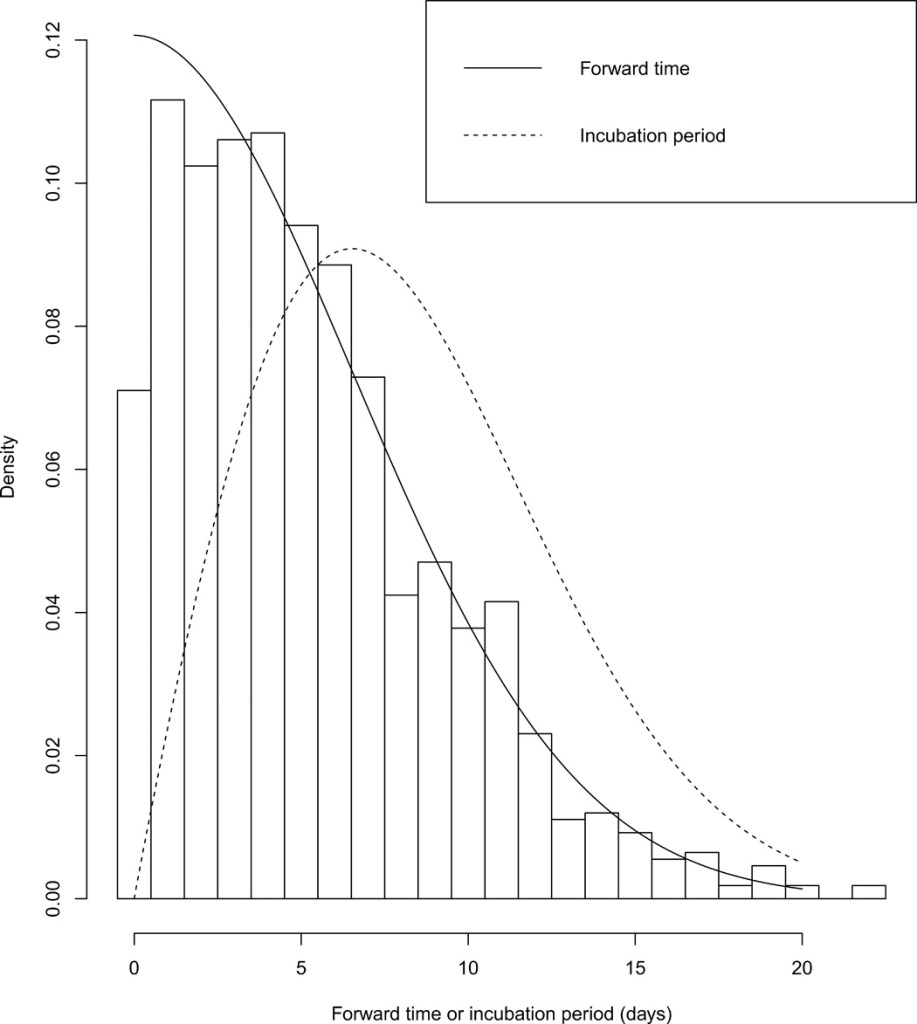
The renewal process was adopted by considering the incubation period as a renewal and the duration between departure and symptoms onset as a forward time. Such a method enhances the accuracy of estimation by reducing recall bias and using the readily available data.







 Code Blog