This API recognizes and reads a text embedded in pictures or photos. Image to Text API uses a neural net (LSTM) based OCR engine which is focused on line recognition, but also supports recognizing the character patterns. It supports both handwriting and printed materials as well as street maps.

APILayer is an API marketplace where also your API can reach a broader audiences, but first you need an API-key for free:
https://api-ninjas.com/api/imagetotext

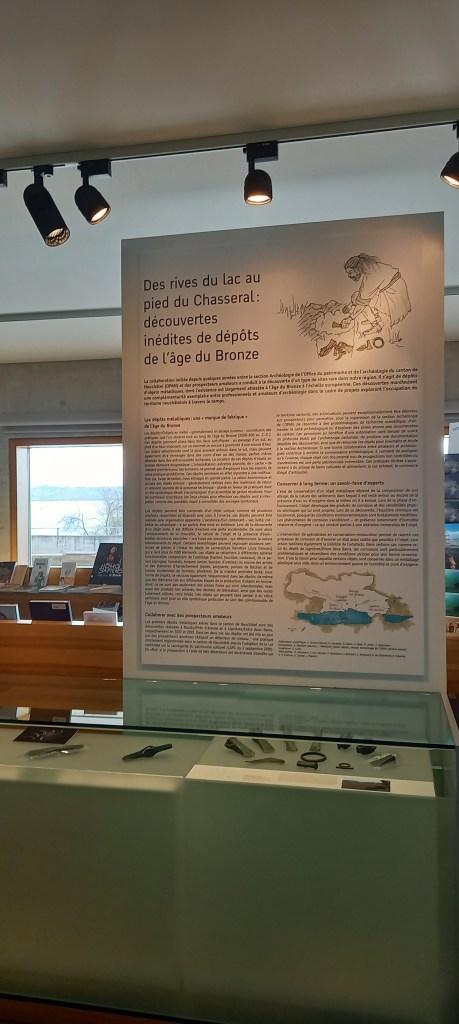
First we need a picture to analyze, it was a photo for which I hadn’t the time to read the content:
We use WinHttp.WinHttpRequest, JSONObjects and TGraphics library with loading and testing the REST-client. Also we pass the API-key as a request-header, so get a key first at: https://apilayer.com/marketplace
Then you must upload your image and put the link in a constant for passing at the API:
Const
  URLIMAGEPATH3 = 'https://breitschtv.wordpress.com/wp-content/uploads/2024/04/scripttest_latin_20240316_133552.jpg?w=768';
The data represents is JSON data with all the text extracted and even the language of the text to scan is auto detected. Before we dive into code this is the main part of the script:
function Image_to_text_API2(AURL, url_imgpath, aApikey: string): string;
var httpq: THttpConnectionWinInet;
    rets: TStringStream;
    heads: TStrings; iht: IHttpConnection; //losthost:THTTPConnectionLostEvent;
begin
  httpq:= THttpConnectionWinInet.Create(true);
  rets:= TStringStream.create('');
  heads:= TStringlist.create;
  try
    heads.add('apikey='+aAPIkey);
    iht:= httpq.setHeaders(heads);
    httpq.Get(Format(AURL,[url_imgpath]), rets);
    if httpq.getresponsecode=200 Then result:= rets.datastring
      else result:='Failed:'+
             itoa(Httpq.getresponsecode)+Httpq.GetResponseHeader('message');
  except
    writeln('EWI_HTTP: '+ExceptiontoString(exceptiontype,exceptionparam));
  finally
    httpq:= Nil;
    heads.Free;
    rets.Free;
  end;
end;                 //}
When you first call the API all the JSON encodings like \u0027 and \n or d\u00e9tecteur results (A JSON string must be double-quoted), so you need a stringify or parseJsonValue function to correct or escape d\u00e9tecteur to détecteur:
Or can you guess what’s this is: Il s’agit de d\u00e9p\u00f4ts\nd’objets m\u00e9talliques
Answer: Il s’agit de dépôts
d’objets métalliques, dont l’existence est largement attestée à l’âge du Bronze.
backstr:= parseJsonvalue(Image_to_text_API2(URL_APILAY,
@main call
URLIMAGEPATH3, ‘dy5L70eQx72794XBZ8sewEgYTZR85_your APIKey‘));
The API itself is simple and straightforward:
URL_APILAY = 'https://api.apilayer.com/image_to_text/url?url=%s';
At a last line we fix the /n (depends on your Operating System or Language) to get a clear carriage and line-feed:
var backstr, validtext: string;

backstr:= parseJsonvalue(Image_to_text_API2(URL_APILAY,
                         URLIMAGEPATH3,
                         'YTZR85_your APIKey'));

validtext:= StringReplace(backstr, '\n',CR+LF,[rfReplaceAll]);

writeln(validtext);
If your programming language is not listed in the Code Example above, you can still make API calls by using a HTTP request library written in your programming language and following the above documentation.
This is an example in Python (Python4Delphi):
procedure PyCode(imgpath: string);
begin
  with TPythonEngine.Create(Nil) do begin
  pythonhome:= 'C:\Users\breitsch\AppData\Local\Programs\Python\Python37-32\';
  try
    loadDLL;
    ExecString('import requests');
    ExecStr('url= "https://api.apilayer.com/image_to_text/url?url='+imgpath+'"');
    ExecStr('payload = {}');
    ExecStr('headers= {"apikey": "dy5L70eQx72794XBZ8sewEgYTZR85_yourAPIKey"}');
    Println(EvalStr('requests.request("GET",url, headers=headers, data=payload).text'));
  except
    raiseError;
  finally
    free;
  end;
 end;
end;
And in Real Python:
import requests

api_url = 'https://api.api-ninjas.com/v1/imagetotext'
image_file_descriptor = open('YOUR_IMAGE.jpeg', 'rb')
files = {'image': image_file_descriptor}
r = requests.post(api_url, files=files)
print(r.json())
Image2Text or Image to Text live demo is providing an API service on its APILayer publication platform. Live Demo feature allows you to test the API within your browser; no need to install or code anything. You can modify all the parameters as you like and interact with the API from many languages.
The result can be (99.97%):
{"lang":"fr","all_text":"TSAPIENS
Des rives du lac au
pied du Chasseral:
découvertes
inédites de dépôts
de l'âge du Bronze
10
La collaboration initiée depuis quelques années entre la section Archéologie de l'Office du patrimoine et de l'archéologie du canton de
Neuchâtel (OPAN) et des prospecteurs amateurs a conduit à la découverte d'un type de sites rare dans notre région. Il s'agit de dépôts
d'objets métalliques, dont l'existence est largement attestée à l'âge du Bronze à l'échelle européenne. Ces découvertes manifestent
une complémentarité exemplaire entre professionnels et amateurs d'archéologie dans le cadre de projets explorant l'occupation du
territoire neuchitelois à travers le temps.





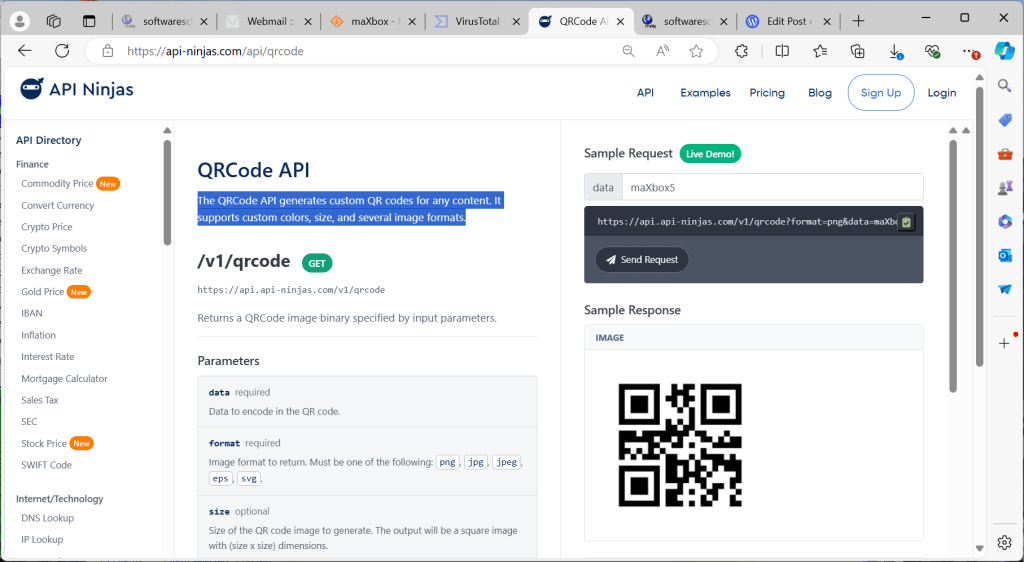
QR Code Generator API
The QRCode API generates custom QR codes for any content. It supports custom colors, size, and several image formats.
function GEO_getQRCode(AURL, aformat, adata, aApikey: string): string;
var httpq: THttpConnectionWinInet;
    rets: TMemoryStream;
    heads: TStrings; iht: IHttpConnection;
begin
  httpq:= THttpConnectionWinInet.Create(true);
  rets:= TMemoryStream.create;
  heads:= TStringlist.create;
  try
    heads.add('X-Api-Key='+aAPIkey);
    heads.add('Accept= image/png');
    iht:= httpq.setHeaders(heads);
    httpq.Get(Format(AURL,[aformat, adata]), rets);
    if httpq.getresponsecode=200 Then begin
       writeln('size of '+itoa(rets.size));
       rets.Position:= 0;
       //ALMimeBase64decodeStream(rets, rets2)
       rets.savetofile((exepath+'qrcodeimage.png'));
       openfile(exepath+'qrcodeimage.png');
     end
      else result:='Failed:'+
             itoa(Httpq.getresponsecode)+Httpq.GetResponseHeader('message');
  except
    writeln('EWI_HTTP: '+ExceptiontoString(exceptiontype,exceptionparam));
  finally
    httpq:= Nil;
    heads.Free;
    rets.Free;
  end;
end;                 //}
The heads.add(‘Accept= image/png’); is important, if you don’t set this request you have to put the stement ALMimeBase64decodeStream(rets, rets2) woth a second memorystream to get image format you want.
 Code Blog