
//////////////////////////////////////////////////////////////////////////////
Python4Delphi II
______________________________________________________________________________
maXbox Starter86_2 – Code with Python4Delphi
Doc as pdf: http://www.softwareschule.ch/download/maxbox_starter86_2.pdf
maXbox Starter86_3 – Code with Python4Delphi
Doc as pdf: http://www.softwareschule.ch/download/maxbox_starter86_3.pdf
Be yourself; Everyone else is already taken. — Oscar Wilde.
In the last Article we have seen that P4D is a set of free components that wrap up the Python DLL into Delphi and Lazarus (FPC). For the next section I want to show more practical implementations. Let’s start with P4D in Delphi:
First create a new Form
- Drop a TMemo (or a TRichEdit)
- Drop a TPythonGUIInputOutput for displaying Python’s results
- Drop a TMemo for source code
- Drop a TPythonEngine
- Connect the attribute IO of the TPythonEngine to
TPythonGUIInputOutput. - Connect the attribute Output of TPythonGUIInputOutput to
TRichEdit. - Drop a TButton and call it “Execute script”
- Double-click on the button and add:
- PythonEngine1.ExecStrings(Memo1.Lines);
- That’s almost all!
- Compile and execute.
- Write in the Memo1: print(2+3)
- Click on the Execute button
You should see in the Output as Memo2 window: 5

_PIC: p4d_d10_4.png
As we can see the memo-control manifests the Python-script as input in memo1 and output in memo2:
object Memo1: TMemo
…
Font.Pitch = fpVariable
Font.Style = []
Lines.Strings = (
‘print(2+3)’)
ParentFont = False
ScrollBars = ssBoth
TabOrder = 1
end
object PythonGUIInputOutput1: TpythonGUIInputOutput
UnicodeIO = True
RawOutput = False
Output = Memo2
Left = 64
end
So in a more complicated script we do have a same memo-control but simply with more lines:
Lines.Strings = (
Lines.Strings = (
      'import sys'
      'print ("Version:", sys.version)'
      'import spam'
      'print (spam.foo('#39'hello world'#39', 1))'
      'p = spam.CreatePoint( 10, 25 )'
      'print ("Point:", p)'
      'p.x = 58'
      'print (p.x, p)'
      'p.OffsetBy( 5, 5 )'
      'print (p)'
      'print ("Current value of var test is: ", test)'
      'test.Value = "New value set by Python"'
      'print (spam.getdouble())'
      'print (spam.getdouble2())')
    ParentFont = False
You do also have the evaluation of an expression. But the eval-uation of an expression works only for arithmetic expressions and not for instructions ! The use of variables and functions is of course possible but constructs like for, def, catch, class, print, import… are not implemented, you use for this ExecStrings() and not EvalStrings().
Using Delphi methods as Python functions
What would be if we use in a internal Python-script some Delphi-methods like in the above script methods of the import module spam? First we had to initialize the module spam, we just need to add our new methods:
procedure TForm1.PythonModule1Initialization(Sender: TObject);
begin
  with Sender as TPythonModule do begin
      AddDelphiMethod( 'foo',
                       spam_foo,
                       'foo' );
      AddDelphiMethod( 'CreatePoint',
                       spam_CreatePoint,
                       'function CreatePoint'+LF+
                       'Args: x, y'+LF+
                       'Result: a new Point object' );
      AddDelphiMethod( 'getdouble',
                       spam_getdouble,
                       'getdouble' );
      AddDelphiMethod( 'getdouble2',
                       spam_getdouble2,
                       'getdouble2' );
    end;
end;
Ans here’s the example of functions defined for the module spam in this context the function spam_foo with forms caption return:
function TForm1.spam_foo(pself, args : PPyObject): PPyObject; cdecl;
begin
with GetPythonEngine do begin
ShowMessage( ‘args of foo: ‘+PyObjectAsString(args) );
ShowMessage( ‘Form”s caption = ‘ + Caption );
Result := ReturnNone;
end;
end;
maXbox code
Handshaking with Python arrays or tuples layout does have some complications. Normal Python arrays (as for standard CPython) are normally called “Lists”. A numpy.array type (or a mutable list) in Python is a special type that is more memory and layout efficient than a normal Python list of normal Py floating point objects.
If you want to use Delphi and access Numpy.array or list, I really suppose that the straightest way to do it would be to implement a way to export some simple straight C functions that access the Numpy.array type.
Numpy.array wraps a standard block of memory that is accessed as a native C array type. This in turn, does NOT map cleanly to Delphi array types as created by a Delphi method to Python.
Let me go deeper in that point, converting a Delphi-array or list to for example a list goes in the end with a dll-function from the Python library (‘PyList_SetItem’):
function TPythonEngine.ArrayToPyList(const items: array of const) : PPyObject;
var
i : Integer;
begin
Result := PyList_New( High(items)+1 );
if not Assigned(Result) then
raise EPythonError.Create(‘Could not create a new list object’);
for i := Low(items) to High(items) do
PyList_SetItem( Result, i, VarRecAsPyObject( items[i] ) );
end;
PyList_SetItem:function
(dp:PPyObject;idx:NativeInt;item:PPyObject):integer; cdecl;PyList_SetItem:= Import(‘PyList_SetItem’);
DLL Extract
The other way round, as I said we can’t map cleanly Python lists to Delphi array types, we get the data sort of as the base type strings from PyObjectAsString:
procedure TPythonEngine.PyListToStrings(list: PPyObject; strings: TStrings );
var
i : Integer;
begin
if not PyList_Check(list) then
raise EPythonError.Create(‘the python object is not a list’);
strings.Clear;
for i:= 0 to PyList_Size( list )- 1 do
strings.Add( PyObjectAsString( PyList_GetItem( list, i ) ) );
end;
I think the common base type in Delphi (to export) is the array and the common base type in Python (to import) is the list. So this we can see as a proof of concept code:
function PythonToDelphi(obj : PPyObject ) : TPyObject;
begin
if IsDelphiObject( obj ) then
Result := TPyObject(PAnsiChar(obj)+Sizeof(PyObject))
else
raise EPythonError.CreateFmt( ‘Python object “%s” is not a Delphi class’,[GetPythonEngine.PyObjectAsString(obj)] );
end;
This exporting of Delphi-methods to use in Python-scripts works also with the creation of a dll as Demo09 Making a Python module as a Dll explains (I’ll show that in the Tutor III).
The Demo for the AddDelphiMethod concept you find at:
https://github.com/maxkleiner/python4delphi/blob/master/Demos/Demo07/test.py
http://py4d.pbworks.com/w/page/9174535/Wrapping%20Delphi%20Objects
More or less some external files as normal Python-scripts is also on your way. For example we call the script test.py and we import explicit the module spam, previously generated in Delphi:
import sys

print "Win version:", sys.winver

import spam

print (spam.foo('hello world', 1))
p = spam.CreatePoint( 10, 25 )
print ("Point:", p)
p.x = 58
print (p.x, p)
p.OffsetBy( 5, 5 )
print (p)
print ("Current value of var test is: ", test)
test.Value = "New value set by Python"
print (spam.getdouble())
You do also have helper functions in the unit PythonEngine.pas
as Global Subroutines to test the environment:
- GetPythonEngine (Returns the global TPythonEngine)
- PythonOK
- PythonToDelphi
- IsDelphiObject
- PyObjectDestructor
- FreeSubtypeInst
- PyType_HasFeature
function GetPythonEngine : TPythonEngine;
function PythonOK : Boolean;
function PythonToDelphi( obj : PPyObject ) : TPyObject;
function IsDelphiObject( obj : PPyObject ) : Boolean;
procedure PyObjectDestructor( pSelf : PPyObject); cdecl;
procedure FreeSubtypeInst(ob:PPyObject); cdecl;
procedure Register;
function PyType_HasFeature(AType : PPyTypeObject; AFlag : Integer): Boolean;
function SysVersionFromDLLName(const DLLFileName : string): string;
procedure PythonVersionFromDLLName(LibName: string; out MajorVersion,
MinorVersion: integer);
For example the PythonOK:
function PythonOK : Boolean;
begin
Result := Assigned( gPythonEngine ) and
(gPythonEngine.Initialized or gPythonEngine.Finalizing);
end;
To run python code integrated in a maXbox, Free Pascal, GNU Pascal or whatever script you need to import just the 3 dll functions1, above all PyRun_SimpleStringFlags or without flags:
Const PYDLLPATH = ‘C:\maXbox\EKON25\decimals’;
PYDLLNAME = ‘python37.dll’;
PSCRIPTNAME = ‘initpy.py’;
This is a simplified interface to PyRun_SimpleString leaving the PyCompilerFlags* argument set to NULL. Normally the Python interpreter is initialized by Py_Initialize() so we use the same interpreter as from a shell, command or terminal.
In P4D you do have the mentioned memo with ExeStrings:
procedure TForm1.Button1Click(Sender: Tobject);
begin
PythonEngine1.ExecStrings( Memo1.Lines );
end;
This explains best the code behind, to evaluate, run or execute an internal Python expression.

_PIC: p4d_d10_4_pyengine.png
The unit PythonEngine.pas is the main core-unit of the framework. Most of the Python/C API is presented as published/public member functions of the engine unit.
…
Py_BuildValue := Import(‘Py_BuildValue’);
Py_Initialize := Import(‘Py_Initialize’);
PyRun_String := Import(‘PyRun_String’);
PyRun_SimpleString := Import(‘PyRun_SimpleString’);
PyDict_GetItemString := Import(‘PyDict_GetItemString’);
PySys_SetArgv := Import(‘PySys_SetArgv’);
Py_Exit := Import(‘Py_Exit’);
…
Wiki & EKON P4D topics
- https://entwickler-konferenz.de/delphi-innovations-fundamentals/python4delphi/
- http://www.softwareschule.ch/examples/weatherbox.txt
Learn about Python for Delphi
Note: You will need to adjust the demos from github accordingly, to successfully load the Python distribution that you have installed on your computer.
Docs: https://maxbox4.wordpress.com/blog/
PascalPython
1Independent from imports and site-packages









Now we can choose between Python hashlib, MS crypto API or Lockbox:
function Advapi32_SHA512: string;
var shaStr: string;
begin
   writeln('crypcontext: '+botostr(CryptAcquireContext(hProv, '', '',
                                PROV_RSA_AES, CRYPT_VERIFYCONTEXT)));
   writeln('crypcreate: '+
     botostr(CryptCreateHash(hProv,CALG_SHA512,hkey,0,hHash)));
   sr:= filetoString(exepath+'maXbox4.exe');
   writeln('crypdata: '
               +botostr(CryptHashData(hhash,sr,length(sr),0)));

   cbHashDataLen:= 64;
   if (CryptGetHashParam512(hHash, HP_HASHVAL,shares4,cbHashDataLen,0))
     then begin
       for it:= 1 to cbHashDataLen do
         shaStr:= shaStr +UpperCase(IntToHex((shares4[it]),2));
      result:= shaStr;
     end;

  println('destroy cryphash-hndl: '+botostr(CryptDestroyHash(hhash)));
  println('cryp_ReleaseContext: '+botostr(CryptReleaseContext(hProv,0)));
  writeln('SHA512 posttest: '+(binToHEX_Str(shares4)))
end;





Blaise 97 
Blaise 98



Python Cheat Sheet Project
Doc as : http://www.softwareschule.ch/examples/cheatsheetpython.pdf
PROGRAM SEPDemo_App_mX4_Python_Cheat_Sheet5;
//Python Cheat Sheet: Functions and Tricks
//http://www.softwareschule.ch/examples/cheatsheetpython.pdf
//https://realpython.com/python-json/
//https://wiki.freepascal.org/Developing_Python_Modules_with_Pascal#Minimum_Python_API
{Purpose: Python Cheat Sheet: Functions and Tricks. }

//<Constant declarations>
//Please check providers list below:['mymemory', 'microsoft', 'deepl', 'libre'].
{TYPE <Type declarations> Pascal-Delphi-Python-Json-OLEAutomation}

Const PYHOME32 = 'C:\Users\max\AppData\Local\Programs\Python\Python36-32\';
      PYDLL32  = 'C:\Users\max\AppData\Local\Programs\Python\Python36-32\python36.dll';

Var  //<Variable declarations>
  i: integer; eg: TPythonEngine;

//<FUNCTION> //<PROCEDURE>
//Generate public key and private key

Const PYBC =  'from bitcoin import *'+LF+
              'my_private_key = random_key()'+LF+
              'my_public_key = privtopub(my_private_key)'+LF+
              'my_bitcoin_addr = pubtoaddr(my_public_key)'+LF+
              'print(my_bitcoin_addr)';

Const USERAGENT = 'Mozilla/5.0 (X11; Linux i686) AppleWebKit/537.17 '+
                  '(KHTML, maXbox4) Chrome/24.0.1312.27 Safari/537.17';

Const WEBURL= 'https://jsonplaceholder.typicode.com/todos';

Const REXDEF= 'def striphtml(data):      '+LF+
               '  p = re.compile(r"<.*?>")'+LF+
               '  return p.sub("", data)  ';

//https://gist.github.com/lkdocs/6519378
Const DEF_RSAKEYS= 'def generate_RSA(bits=2048): '+LF+
          '  '''''+LF+
          //'  Generate an RSA keypair with exponent of 65537 in PEM format'+LF+
          //'  param: bits The key length in bits '+LF+
          //'  Return private key and public key '+LF+
          '  '''''+LF+
          '  from Crypto.PublicKey import RSA '+LF+
          '  new_key = RSA.generate(bits, e=65537)'+LF+
          '  public_key = new_key.publickey().exportKey("PEM")'+LF+
          '  private_key = new_key.exportKey("PEM")'+LF+
          '  return private_key, public_key';

procedure GetJSONData;
var  XMLhttp: OleVariant; // As Object Automation
     ajt: TJson; JObj: TJsonObject2; JArray: TJsonArray2;
     response,statuscode: string; cnt: integer;
begin
  XMLhttp:= CreateOleObject('msxml2.xmlhttp')
  XMLhttp.Open('GET', WEBURL, False)   //False is async
  //XMLhttp.setRequestHeader('Content-Type','application/x-www-form-urlencoded');
  XMLhttp.setRequestHeader('Content-Type', 'application/json; charset=utf-8');
  XMLhttp.Send();
  response:= XMLhttp.responseText; //assign the data
  statuscode:= XMLhttp.status;
  //writeln(statuscode +CRLF+ response)
  ajt:= TJson.create();
  try
    ajt.parse(response);
  except
    writeln( 'Exception: <TJsonClass>"" parse error: {'+
                  exceptiontostring(exceptiontype, exceptionparam))
  end;
  JArray:= ajt.JsonArray;
  writeln('Get all Titles: '+itoa(jarray.count));
  for cnt:= 0 to jarray.count-1 do
    writeln(itoa(cnt)+' '+Jarray.items[cnt].asObject.values['title'].asString);
  ajt.Free;
end;

Begin  //@Main
//<Executable statements>
//https://www.amazon.com/Patterns-konkret-Max-Kleiner/dp/3935042469
{ ISBN-10 ? : 3935042469  ISBN-13 ? : 978-3935042468}

  eg:= TPythonEngine.Create(Nil);
  eg.pythonhome:= PYHOME32;
  eg.opendll(PYDLL32)
  //eng.IO:= pyMemo;
  try
    eg.Execstring('import base64'+LF+'import urllib.parse');
    eg.Execstring('import urllib.request, os, textwrap, json, requests');
    eg.Execstring(REXDEF);

   { eg.Execstring('import nacl');
    eg.Execstring('from nacl.encoding import HexEncoder'+CRLF+
                   'from nacl.exceptions import CryptoError'+CRLF+
                   'from nacl.encoding import Base64Encoder'+CRLF+
                   'from pydub import AudioSegment');  }

   //eg.Execstring('from Crypto.PublicKey import RSA');

   println(eg.evalStr('base64.b64decode("2e8WuEr0+5nc14VBxQrOl4ob6guOTySr")'));
  //eng.Execstring('priv_key = nacl.public.PrivateKey.generate()');
  //openWeb('http://www.softwareschule.ch/examples/cheatsheetpython.pdf');

  //# 1.map(func, iter) Executes the function on all elements of iterable
   println(eg.evalStr('list(map( lambda x: x[0],["red","green","blue"]))'));

  //# 2.map(func, i1,...,Executes the function on all k elements of k iterables
   println(eg.evalStr('list(map(lambda x,y: str(x)+" "+y + "s",[0,2,2],'+
                                       '[ "apple" , "orange" , "banana" ]))'));

  //# 3.string.join(iter), Concatenates iterable elements separated by string
   println(eg.evalStr('" marries " .join(list([ "Alice" , "Bob" ]))'));

  //# 4.filter(func,iterable),Filters out elements in iterable for function returns False (or 0)
   println(eg.evalStr('list(filter(lambda x: True if x> 17 else False,[1,15,17,18]))'));

  //# 5.string.strip(), Removes leading and trailing whitespaces of string
   println(eg.evalStr('( " \n \t 42 \t " .strip())'));

  //# 6.sorted(iter), Sorts iterable in ascending order
   println(eg.evalStr('sorted([ 8 , 3 , 2 , 42 , 5 ])'));

  //# 7.sorted(iter,key=key) , Sorts according to the key function in ascending order
   println(eg.evalStr('sorted([ 8,3,2,42,5 ], key=lambda x: 0 if x== 42 else x)'));

  //# 8.help(func) , Returns documentation of func
  // println(eg.evalStr('help(''print'')'));
   saveString(exepath+'pyhelp.py', 'help(''print'')');
   print(getDosOutput('py '+exepath+'pyhelp.py', exePath));

  //# 9.zip(i1, i2, ...), Groups the i-th elements of iterators i1,i2,...together
   println(eg.evalStr('list(zip([''Alice'',''Anna''],[''Bob'',''Jon'',''Frank'']))'));

  //# 10.Unzip, Equal to: 1) unpack the zipped list, 2) zip the result
   println(eg.evalStr('list(zip(*[(''Alice'',''Bob''),(''Anna'',''Jon'')]))'));

  //# 11.enumerate(iter), Assigns a counter value to each element of iterable
   println(eg.evalStr('list(enumerate(["Alice","Bob","Jon"]))'));

  //# 12.python -m http.server<P>,Want to share files between PC and phone?
  //https://docs.python.org/3/library/http.server.html
   //print(getDosOutput('py -m http.server<8080>', exePath));
   //ExecuteShell('py', '-m http.server 8080');

  //# 13.Read comic Open the comic series xkcd in your web browser
  //eg.Execstring('import antigravity');

  //# 14.Zen of Python import this
   eg.execString('from this import *');
   println('14. import this: '+CRLF+
        StringReplace(eg.EvalStr('repr("".join([d.get(c,c) for c in s]))'),
                                                '\n',CR+LF,[rfReplaceAll]));

  //# 15.Swapping numbers, Swapping vars is a breeze in Python. No offense, Java!
  eg.execString('a, b = ''Jane'' , ''Alice'''+CRLF+'a, b = b, a');
  println(eg.evalStr('a, b'));

  //# 16.Unpacking arguments, Use a sequence as function arguments!
  eg.execString('def f (x, y, z) : return x + y * z');
  println(eg.evalStr('f(*[ 1 , 3 , 4 ])'));
  println(eg.evalStr('f(**{ ''z'': 4 , ''x'': 1 , ''y'': 3 })'));

  // eg.Execstring('AudioSegment.from_wav(r"C:\maXbox\soundnvision\01_magix.wav").export(r"C:\maXbox\mX47464\maxbox4\web\G9\G9_magix.mp3", format="mp3")');

    { eng.Execstring(DEF_RSAKEYS);
      eng.Execstring('d=generate_RSA(bits=2048)')
      println('RSA Publickey '+eng.evalStr('d[1]'));  }

   //# Get the maximum number of complete TODOs.
   //println('user_max_complete = '+eng.evalStr('top_users[0][1]'));

  except
    eg.raiseError;
  finally
    eg.Free;
    //aPythonVersion.Free;
  end;

  //GetJSONData;
  //maXcalcF('2^64 /(60*60*24*365)')
//<Definitions>
End.

Ref:  https://www.sonarqube.org/features/multi-languages/python/
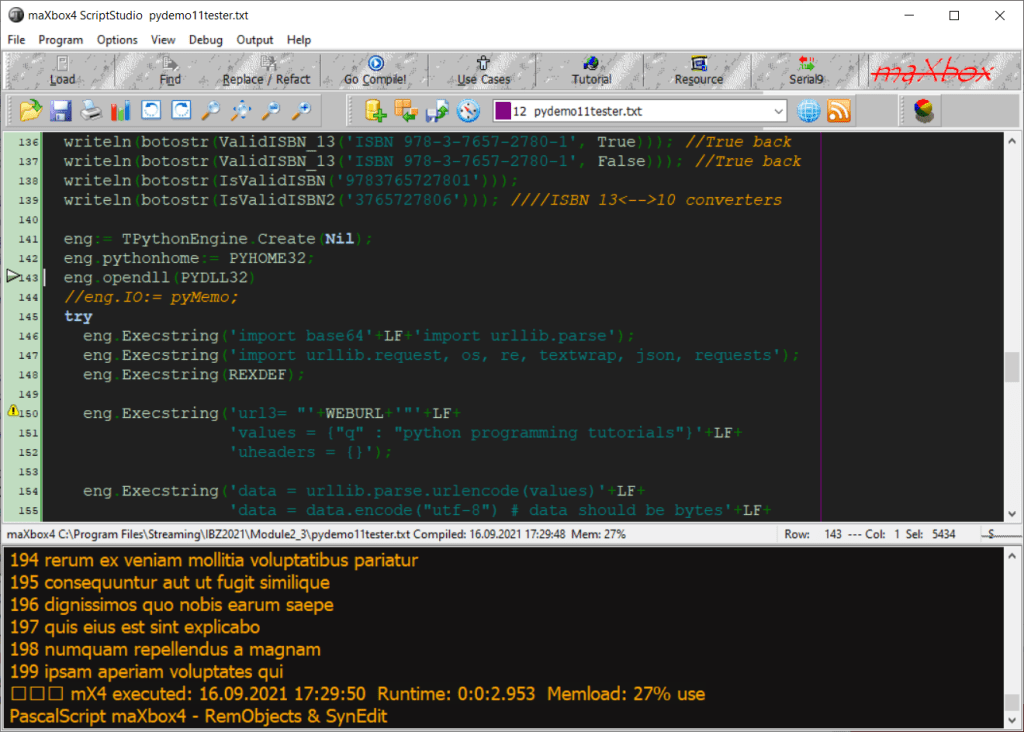
 mX4 executed: 20/09/2021 19:20:40  Runtime: 0:0:2.782  Memload: 69% use

C:\maXbox\mX39998\maxbox3>pip3 install -t C:\Users\max\AppData\Local\Programs\Py
thon\Python36-32\Lib pydub
Collecting pydub
  Downloading pydub-0.25.1-py2.py3-none-any.whl (32 kB)
Installing collected packages: pydub
Successfully installed pydub-0.25.1

Then to convert any file from wav to mp3 just use pydub as
import pydub
sound = pydub.AudioSegment.from_wav("D:/example/apple.wav")
sound.export("D:/example/apple.mp3", format="mp3")

Exception: <class 'OSError'>: Cannot load native module 'Crypto.Hash._MD5': Trying '_MD5.cp36-win32.pyd': [WinError 126] The specified module could not be found, Trying '_MD5.pyd'

Patterns konkret.
ISBN-13: 9783935042468  ISBN-10: 3935042469
Author: Kleiner, Max
Binding: Paperback
Publisher: Software + Support
Published: September 2003

https://mymemory.translated.net/doc/spec.php
Hello PyWorld_, This data will be written on the file.
Hola PyWorld_,
 Estos datos se escribirán en el archivo.

Install a 32-bit package with a 64 pip installer -t (Target)
C:\Users\max\AppData\Local\Programs\Python\Python36-32>pip3 install -t C:\Users\
max\AppData\Local\Programs\Python\Python36-32\Lib bitcoin
----File newtemplate.txt not exists - now saved!----
Python Cheat Sheet Project 2
PROGRAM SEPDemo__PythonTemplate_Puzzle_25;
//https://medium.com/fintechexplained/top-python-tips-tricks-dd996b807865

Const PYHOME32 = 'C:\Users\max\AppData\Local\Programs\Python\Python36-32\';
      PYDLL32  = 'C:\Users\max\AppData\Local\Programs\Python\Python36-32\python36.dll';

      CHEXSTR = '00:c9:73:e2:3b:11:01:2f:2c:62:a4:1a:74:3f:92:';

      HEXCONVERT =
      '""" convert hex string integer to int """ '+LF+
      'def convert(n: str) -> int:               '+LF+
      '    # get rid of ":", spaces and newlines '+LF+
      '    hex = n.replace(":", "").replace("\n","").replace(" ","")'+LF+
      '    return int(hex,16)';

var bufs, tabstr: string;
Begin  //@Main
  maxform1.console1click(self)
  memo2.height:= 200;
  memo2.font.name:= 'Courier';
  with TPythonEngine.Create(Nil) do begin
    pythonhome:= PYHOME32;
    try
     opendll(PYDLL32)
      Println('Colab Platform: '+
          EvalStr('__import__("platform").platform()'));
     Println('DIR Check: '+
     EvalStr('__import__("subprocess").check_output("dir",shell=True).strip().decode()'));
     //1. Unpacking Array Items
     ExecString('first_name, last_name = ["Farhad", "Malik"]');
     Println('Unpacking Array: '+EvalStr('first_name, last_name'));
     //2. Swapping Variables
     ExecString('last_name, first_name = first_name, last_name');
     Println('Swapping Variables: '+EvalStr('first_name, last_name'));
     //4. Repeat String
     Println('Repeat String: '+EvalStr('"A"*3'));
     //5. Slicing
     ExecString('y = "Abc"');
     Println('5. Slicing: '+EvalStr('y[:2], y[1:], y[:-2], y[-2:]'));
     ExecString('x = "abc"');
     Println('6. Reversing: '+EvalStr('x[::-1]'));
     Println('6. Reversing: '+EvalStr('"abc"[::-1]'));
     Println('7. Negative Index: '+EvalStr('"abc"[-1]'));
     Println('8. Intersect Sets: '+EvalStr('{1,2,3}.intersection({3,4,5})'));
     Println('9. Difference In Sets: '+EvalStr('{1,2,3}.difference({3,4,5})'));
     Println('10. Union Of Collections: '+EvalStr('{1,2,3}.union({3,4,5})'));
     ExecString('def my_new_function(my_value="hello"):'+LF+
                '  return my_value');
     Println('11. Optional Arguments: '+EvalStr('my_new_function()'));
     Println('11. Optional Arguments: '+EvalStr('my_new_function("test")'));

     ExecString('l=[]'+LF+'def myfunc(*arguments):'+LF+
                '  for a in arguments:            '+LF+
                '    l.append(a)                  '+LF+
                '  return l                       '  );
     Println('12. Unknown Arguments Using *arguments: '+
                  EvalStr('myfunc("a","b","c")'));

     ExecString('def myfunc2(**arguments):'+LF+
                '  return arguments["city"]');
     ExecString('ddata={"school":"DAV","standard":"7","city": "Delphi"}');
     Println('13. Dictionary As Arguments Using **arguments '+
                  EvalStr('myfunc2(**ddata)'));

     Println('20. Joining Collection: '+EvalStr('" ".join(["FinTech", "Explained"])'));
     Println('21. Memory Footprint Of An Object: '+
                  EvalStr('__import__("sys").getsizeof("farhadmalik")'));
     Println('22. Print Current Directory: '+
                  EvalStr('__import__("os").getcwd()'));

     ExecString('import sys');
     Println('23. Print Imported Modules: '+
                  EvalStr('[m.__name__ for m in sys.modules.values() if m]'));
     Println('24. Get Current Process Id: '+
                  EvalStr('__import__("os").getpid()'));
     ExecString('data={"Name": "Roger","Pin": 3056,"ActNo":9892345112234565}');
     Println('25. FrozenSet: '+
                  EvalStr('frozenset(data)'));
     ExecString('with open("pydata.txt","w") as f:'+LF+' f.write("HelloPy2")');
     openfile(exepath+'pydata.txt');
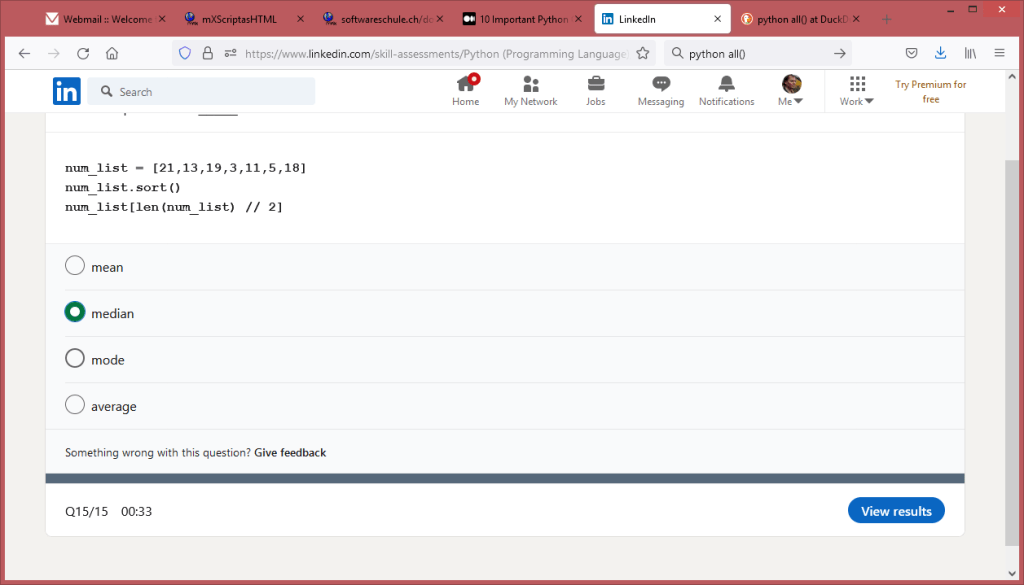
     ExecString('num_list = [21,13,19,3,11,5,18]'+LF+'num_list.sort()');
     Println('26. Median Skill Test: '+EvalStr('num_list[len(num_list)//2]'));
    except
      raiseError;
    finally
      Free;
    end;
  end;
    Writeln('Demo01	A simple Python evaluator Gauss evaluator '+CRLF+
   'Demo02	Evaluate expression with ExecSynCheck1 and Strlist '+CRLF+
   'http://www.softwareschule.ch/examples/pydemo2.txt          '+CRLF+
   'http://www.softwareschule.ch/examples/pydemo2.htm          '+CRLF+
   'Demo03	15-powerful-python-one-liners PYLaz_P4D_Demo2      '+CRLF+
   'Demo04	Eval_IOEvents (advanced case) Demo3 PYLaz_P4D_Demo2'+CRLF+
   'Demo05	Defining a mX4_Python Template                     '+CRLF+
   'Demo06	Defining a Python Template_PyCryptoDome_Bitcoin    '+CRLF+
   'Demo07	Using Translator with Subprocess()                 '+CRLF+
   'Demo25	this finteche expalained Demo                      ');
End.
Results of PyDemo25
Unpacking Array: (‘Farhad’, ‘Malik’)
Swapping Variables: (‘Malik’, ‘Farhad’)
Repeat String: AAA
- Slicing: (‘Ab’, ‘bc’, ‘A’, ‘bc’)
- Reversing: cba
- Reversing: cba
- Negative Index: c
- Intersect Sets: {3}
- Difference In Sets: {1, 2}
- Union Of Collections: {1, 2, 3, 4, 5}
- Optional Arguments: hello
- Optional Arguments: test
- Unknown Arguments Using *arguments: [‘a’, ‘b’, ‘c’]
- Dictionary As Arguments Using **arguments Delphi
- Joining Collection: FinTech Explained
- Memory Footprint Of An Object: 36
- Print Current Directory: C:\maXbox\mX39998\maxbox3
- Print Imported Modules: [‘builtins’, ‘sys’, ‘importlib._bootstrap’, ‘_imp’, ‘_warnings’, ‘_thread’, ‘_weakref’, ‘importlib._bootstrap_external’, ‘io’, ‘marshal’, ‘nt’, ‘winreg’, ‘zipimport’, ‘encodings’, ‘codecs’, ‘_codecs’, ‘encodings.aliases’, ‘encodings.utf_8’, ‘_signal’, ‘main‘, ‘encodings.latin_1’, ‘io’, ‘abc’, ‘_weakrefset’, ‘site’, ‘os’, ‘errno’, ‘stat’, ‘_stat’, ‘ntpath’, ‘genericpath’, ‘ntpath’, ‘collections.abc’, ‘_sitebuiltins’, ‘sysconfig’, ‘_bootlocale’, ‘_locale’, ‘encodings.cp1252’, ‘types’, ‘functools’, ‘_functools’, ‘collections’, ‘operator’, ‘_operator’, ‘keyword’, ‘heapq’, ‘_heapq’, ‘itertools’, ‘reprlib’, ‘_collections’, ‘weakref’, ‘collections.abc’, ‘importlib’, ‘importlib._bootstrap’, ‘importlib._bootstrap_external’, ‘warnings’, ‘importlib.util’, ‘importlib.abc’, ‘importlib.machinery’, ‘contextlib’, ‘mpl_toolkits’, ‘google’, ‘time’, ‘datetime’, ‘math’, ‘_datetime’, ‘platform’, ‘re’, ‘enum’, ‘sre_compile’, ‘_sre’, ‘sre_parse’, ‘sre_constants’, ‘copyreg’, ‘subprocess’, ‘signal’, ‘threading’, ‘traceback’, ‘linecache’, ‘tokenize’, ‘token’, ‘msvcrt’, ‘_winapi’, ‘socket’, ‘_socket’, ‘selectors’, ‘select’]
- Get Current Process Id: 5436
- FrozenSet: frozenset({‘ActNo’, ‘Pin’, ‘Name’})
- Median Skill Test: 13
http://www.softwareschule.ch/examples/pydemo25.htm
http://www.softwareschule.ch/examples/pydemo25.txt

Linkedin Assessment
Compare Python with Pascal
num_list = [21,13,19,3,11,5,18]
num_list.sort()
print(num_list[len(num_list) // 2])
>>>13
Median: The middle number; found by ordering all data points and picking out the one in the middle (or if there are two middle numbers, taking the mean of those two numbers)
with TStringlist.create do begin
  Sorted:= true;
  DelimitedText:= '21,13,19,03,11,05,18';
  sort;
  writeln('median: '+strings[count div 2]);
  free
end;
Or with a integer typed list
with TIntlist.create do begin
  add(21);add(13);add(19);add(3);add(11);add(5);add(18);
  sort;
  writeln('median: '+itoa(integers[count div 2]));
  free
end;
EKON 25 Python4Delphi MX4 by Max Kleiner on Scribd https://www.scribd.com/embeds/533522820/content?start_page=1&view_mode=scroll&access_key=key-02UWWWzhh4J7lLZecgS1
  with TDoubleList.create do begin
     add(21.0);add(13.0);add(19.0);add(3.0);add(11.0);add(5.0);add(18.0);
     //loadfromfile
     sortup;
     PrintF('mediandbl: %.2f ',[items[count div 2]])
     free;
  end;




 Code Blog
Results of CheatSheetProject:
[‘r’, ‘g’, ‘b’]
[‘0 apples’, ‘2 oranges’, ‘2 bananas’]
Alice marries Bob
[18]
42
[2, 3, 5, 8, 42]
[42, 2, 3, 5, 8]
Help on built-in function print in module builtins:
print(…)
print(value, …, sep=’ ‘, end=’\n’, file=sys.stdout, flush=False)
Prints the values to a stream, or to sys.stdout by default.
Optional keyword arguments:
file: a file-like object (stream); defaults to the current sys.stdout.
sep: string inserted between values, default a space.
end: string appended after the last value, default a newline.
flush: whether to forcibly flush the stream.
[(‘Alice’, ‘Bob’), (‘Anna’, ‘Jon’)]
[(‘Alice’, ‘Anna’), (‘Bob’, ‘Jon’)]
[(0, ‘Alice’), (1, ‘Bob’), (2, ‘Jon’)]
14. import this:
“The Zen of Python, by Tim Peters
Beautiful is better than ugly.
Explicit is better than implicit.
Simple is better than complex.
Complex is better than complicated.
Flat is better than nested.
Sparse is better than dense.
Readability counts.
Special cases aren’t special enough to break the rules.
Although practicality beats purity.
Errors should never pass silently.
Unless explicitly silenced.
In the face of ambiguity, refuse the temptation to guess.
There should be one– and preferably only one –obvious way to do it.
Although that way may not be obvious at first unless you’re Dutch.
Now is better than never.
Although never is often better than *right* now.
If the implementation is hard to explain, it’s a bad idea.
If the implementation is easy to explain, it may be a good idea.
Namespaces are one honking great idea — let’s do more of those!”
(‘Alice’, ‘Jane’)
13
13
LikeLike