
maXbox Starter 142 – Get a GEO distance.
“Natura abhorret vacuum1 – Spinoza.
Source: 1390_Sphenic_Numbers2TIO_12_py_uc.txt
1397_Geolocation_distance12_uc.txt
Nominatim can power the search box on your website, allowing your users to type free-form queries (“Cafe Paris, Cologne”) in any language. It also offers a structured query mode (“postcode=12345”, “city=London”, “type=cafe”) that helps you to automate geocoding of extensive address lists.
https://sourceforge.net/projects/maxbox5/files/examples/1274_GoogleMapsAPI_General1.pas/download
Sometimes life is like playing with us: You write some useful code that solves a problem, and then someone comes along and makes the problem much harder. Here’s how to continuously integrate new solutions without having to rewrite your old solutions (as much). Means you don’t have to change the language, you change the environment.
Let’s start with a simple problem: Get the distance between two earth-coordinates. Calculating the geographical distance between two points on the Earth’s surface can be done using the Haversine formula. This formula accounts for the spherical shape of the Earth. Below is a Delphi and Python function that performs this calculation:
type
 TipGeolocation = record
     Latitude: Double; //read Coordinates[0] write SetLatitude;
     Longitude: Double; //read Coordinates[1] write SetLongitude;
  end;
For the purposes of this task we make the problem harder, a geocoding function with a record pair of coordinates:
const
    EARTHS_RADIUS_IN_METERS = 6378137;


function TipGeolocationDistanceInMetersTo(
                     const AGeolocation: TipGeolocation;
                           Latitude, Longitude: Double): Double;
var LDeltaLat, LDeltaLong, LA: Double;
begin
  LDeltaLat:= DegToRad(AGeolocation.Latitude - Latitude);
  LDeltaLong:= DegToRad(AGeolocation.Longitude - Longitude);
  LA:= Sin(LDeltaLat / 2) * Sin(LDeltaLat / 2) + Cos(DegToRad(Latitude)) *
       Cos(DegToRad(AGeolocation.Latitude)) * Sin(LDeltaLong / 2) * Sin(LDeltaLong / 2);
  Result:= Abs(EARTHS_RADIUS_IN_METERS * 2 * ArcTan2(Sqrt(LA), Sqrt(1 - LA)));
end;
This function calculates the distance between two points given their latitude and longitude in degrees. The example usage calculates the distance between Bern and Paris. Feel free to adapt the coordinates to your specific needs!
Geoloc_setup;    //reference data2
writeln('Distance Bern,CH - Paris,F: '+
         format('%2.4f m ',[TipGeolocationDistanceInMetersTo(tipgeoloc1,lat2,lon2)]));
And in Python: import math
def haversine_distance(lat1, lon1, lat2, lon2):
    # Radius of the Earth in kilometers
    R = 6371.0

    # Convert latitude and longitude from degrees to radians
    lat1_rad = math.radians(lat1)
    lon1_rad = math.radians(lon1)
    lat2_rad = math.radians(lat2)
    lon2_rad = math.radians(lon2)

    # Differences in coordinates
    dlat = lat2_rad - lat1_rad
    dlon = lon2_rad - lon1_rad

    # Haversine formula
    a = math.sin(dlat / 2)**2 + math.cos(lat1_rad) *math.cos(lat2_rad) * math.sin(dlon / 2)**2
    c = 2 * math.atan2(math.sqrt(a), math.sqrt(1 - a))

    # Distance in kilometers
    distance = R * c
    return distance

# Example usage
lat1 = 46.94809  # Latitude of Bern
lon1 = 7.44744   # Longitude of Bern
lat2 = 48.8566   # Latitude of Paris
lon2 = 2.3522    # Longitude of Paris

distance = haversine_distance(lat1, lon1, lat2, lon2)
print(f"The distance between Bern and Paris is {distance:.2f} kilometers.")
>>> The distance between Bern and Paris is 434.96 kilometers.
Often, we calculate the great-circle distance of given two points in geophysics, for example, the distance from the seismic station to the epicenter. Supposing that we have two geographical points, and let’s say P1:(ϕ1,λ1)and P2:(ϕ2,λ2), where,ϕ and λ represent the latitude and longitude, respectively. Using Haversine formula, we can calculate the great-circle distance.
The great-circle distance, orthodromic distance, or spherical distance is the distance between two points on a sphere, measured along the great-circle arc between them.

Next we need a geocoding API. Geocoding is the process of transformation of any location name into geographical coordinates, and the other way around (reverse geocoding). OpenWeather’s Geocoding API and OpenStreetMap supports both the direct and reverse methods, working at the level of city names, areas and districts, countries and states:
Test the link above then you get:

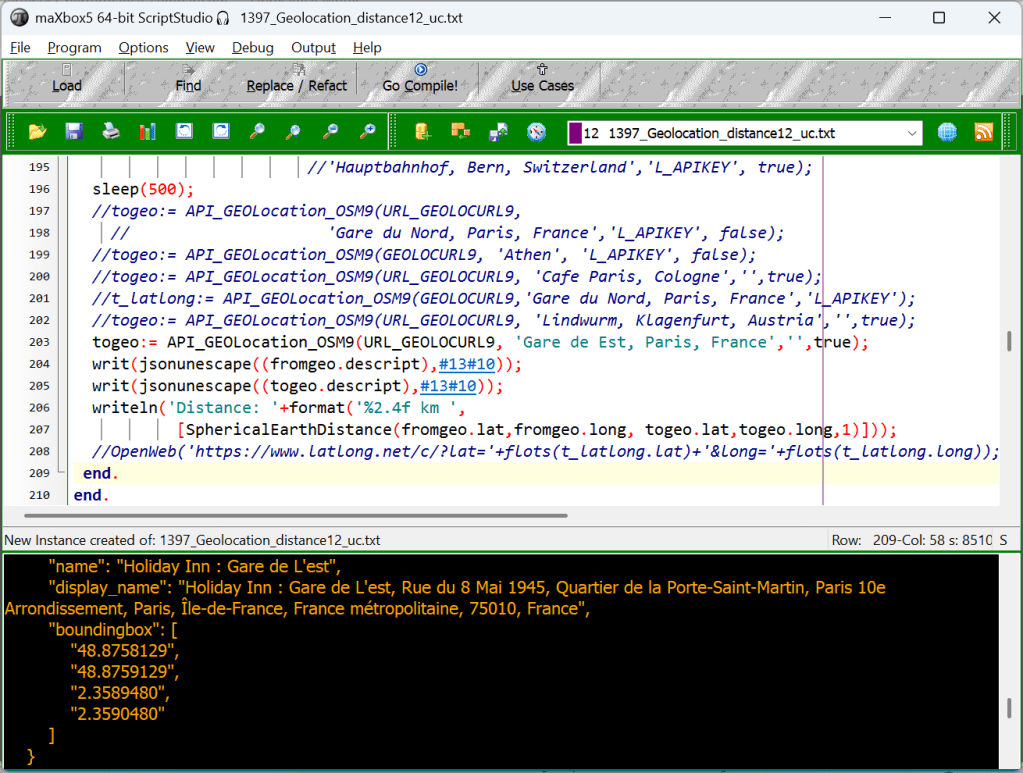
Take the result with the most importance after place_rank like 0.50962:

const URL_GEOLOCURL9 = 'https://nominatim.openstreetmap.org/search?format=json&q=%s';
      URL_APILAY_GEO = 'https://api.apilayer.com/geo/country/capital/%s';

var fromgeo, togeo: Tlatlong;

function API_GEOLocation_OSM9(AURL, aloc, aApikey: string;
                                             verbose: boolean): Tlatlong;
var Httpreq: THttpRequestC; httpres: string;
    jsn: TMcJsonItem;
begin
  httpreq:= THttpRequestC.create(self);
  httpreq.headers.add('Accept: application/json; charset=utf-8');
  //httpreq.headers.add('X-Api-Key:'+aAPIkey);
  httpreq.useragent:= USERAGENT5;
  httpreq.SecurityOptions:= [soSsl3, soPct, soIgnoreCertCNInvalid];
  try
    if httpreq.get(Format(AURL,[aloc])) then begin
       httpres:= (httpreq.Response.ContentAsUTF8String)
       writeln('conttype '+httpreq.Response.ContentType);
       if verbose then writ('debug back '+formatJson(httpres));
       jsn:= TMcJsonItem.Create;
       jsn.AsJSON:= httpres;
       result.lat:= jsn.at(0,'lat').asnumber;
       result.long:= jsn.at(0,'lon').asnumber;
       result.descript:= Format('Coords: lat %2.5f lng %2.5f %s osm_id: %s ',
                                [result.lat,result.long,jsn.at(0,'name').asstring,
                                                        jsn.at(0,'osm_id').asstring]);
    end else Writeln('APIError '+inttostr(Httpreq.Response.StatusCode2));
  except
    writeln('EWI_APIHTTP: '+ExceptiontoString(exceptiontype,exceptionparam));
  finally
    writeln('Status3: '+gethttpcod(httpreq.Response.statuscode2))
    httpreq.Free;
    sleep(200);
    jsn.Free;
  end;
end;
const
URL_GEOLOCURL9 = ‘https://nominatim.openstreetmap.org/search?format=json&q=%s‘;
URL_APILAY_GEO = ‘https://api.apilayer.com/geo/country/capital/%s‘;
Test it by calling the const URL below, for example:

Nominatim uses OpenStreetMap data to find locations on Earth by name and address (geocoding) as you can see in the const URL_GEOLOCURL9. It can also do the reverse, find an address for any location on the planet. The Geocoding API relies on a redundant infrastructure of geocoder nodes powered by the Nominatim software with edge servers for fast delivery of results.
Note that when you get an
APIError 403
Status3: SC_FORBIDDEN
Status3: SC_FORBIDDEN
Exception: Invalid pointer operation at 875.1746
or an
EWI_HTTP: Exception: The request has timed out.
Status3:
Null Pointer Exception at 929.1876
then you are not following the Nominatim Usage policy, see here: https://operations.osmfoundation.org/policies/nominatim/
You’ll have to be esp. careful about including a unique user agent for your application and change from time to time;
It sounds like you’re encountering a “403 Forbidden” error when trying to use the Nominatim API. This error typically indicates that your request is being blocked, possibly due to rate limiting, incorrect usage, or IP blocking. Here are a few steps you can take to troubleshoot and resolve this issue:
Check API Usage Limits: Ensure that you are not exceeding the usage limits set by Nominatim. They have strict policies to prevent abuse. Review their usage policy to make sure you’re compliant.
User-Agent Header: Nominatim requires a valid User-Agent header in your requests. Make sure you include a descriptive User-Agent string that identifies your application. Best is do rotate useragents:
const
  USERAGENT5 = 'Mozilla/5.0 (Windows NT 10.0; Win64; x64) AppleWebKit/537.36 (KHTML, like
                                                                              Gecko)'+
                   ' Chrome/126.0.0.0 Safari/537.36 Edg/126.0.0.0 ';
  USERAGENT2 = 'Mozilla/4.0 (compatible; MSIE 7.0; Windows NT 5.1';
  USERAGENT3 = 'Mozilla/5.0 (Windows NT 10.0; Win64; x64) AppleWebKit/537.36 (KHTML, like
                Gecko)'+' Chrome/125.0.0.0 Safari/537.3';                // chrome + win
  USERAGENT4 = 'Mozilla/5.0 (Macintosh; Intel Mac OS X 10_15_7) AppleWebKit/605.1.15'+
                   ' (KHTML, like Gecko) Version/17.4.1 Safari/605.1.1'; // safari + mac
  USERAGENT1 = 'Mozilla/5.0 (Windows NT 10.0; Win64; x64) AppleWebKit/537.36 '+
                   '(KHTML, like Gecko) Chrome/126.0.0.0 Edg/126.0.0.';  // edge + win
const useragents
softwareschule.ch/examples/geodistance1.htm
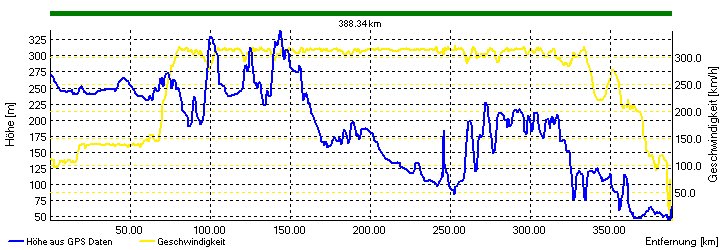
Most of the time, ~ 75% in this case, it is spent with API IP-connection. So we put in maXbox processmessagesOFF; and processmessagesON; between start and stop-time for time measure.
The interesting point is to know where the code is running and how it is stored in an executable or script itself. Solution 1 and 2 can running on the web or on premise all others run locally or on a server.
3 Solutions Overview of GEO Distance Math Solver
- Internal scripted TipGeolocationDistanceInMetersTo() in maXbox5
- External def haversine_distance () call of Python for Delphi(P4D)
- Internal compiled function SphericalEarthDistance()
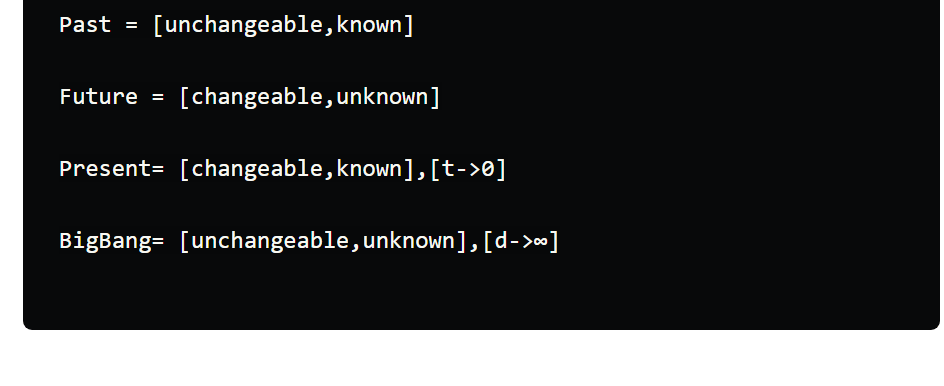
| Past | Present | known |
| Big Bang | Future | unknown |
| unchangeable | changeable | Time/Space |
The multiplication of past times future is a vector with the function: known = f(changeable) [y=f(x)] as distance over time, so distance is a function of time: d=f(t)
Conclusion
When it comes to problem-solving, there are often multiple solutions that can be used to solve the same problem. The choice of solution depends on various factors such as performance, storage, implementation, simplicity, and also scaleability and security in different environments. The code is more or less the same but the choice of the environment (script, executable, container, hosting, web or cloud API) could be a response of different requirements.
Great Circle Mapper is a tool that shows the shortest route between two or more locations on a globe. You can enter airports, cities, or coordinates and get a distance back with a geocode API.
Script:
https://sourceforge.net/projects/maxbox5/files/examples/1397_Geolocation_distance12_uc.txt/download
References:
Home – Geocoding API Documentation

Doc and Tool: maXbox5 – Manage Files at SourceForge.net
As PDF: http://www.softwareschule.ch/download/maxbox_starter142.pdf
Max Kleiner 23/04/2025
1 Nature recoils from emptiness –


From our technical advisor, Jerry King From your Editor
Why ‘OPEN SOURCE’ AI isn’t truly Open By Stefano Maffuli
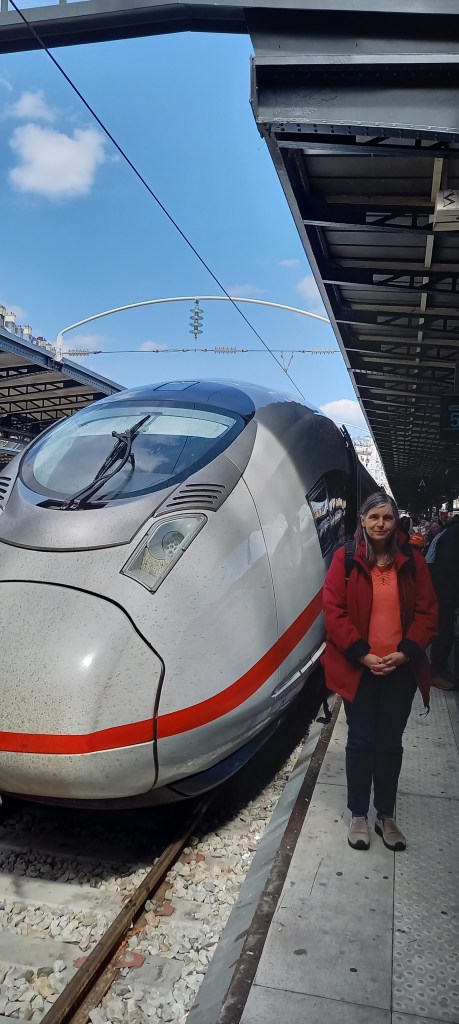
Geocoding Distance By Max Kleiner
Alea Iacta Est, the die is cast By Reinhold Schmitt
Programming the QUEENS puzzle By David Dirkse
Threading in the Browser Understanding how to create a WEBASSEMBLY APPLICATION
By Michael van Canneyt
ORMs for various platforms A blog created by Kim Madsen (kbmMW)
Quantum Network Explorer By Prof.Dr. Stephanie Wehner
Explaining the extended RTTI in PAS2JS By Michael van Canneyt









 Code Blog
And the Pascal, Python script one:
https://sourceforge.net/projects/maxbox5/files/examples/1397_Geolocation_distance12_uc_py.txt/download
LikeLike
With Mapbox Geofencing, customers can define and monitor custom areas of interest, then trigger actions based on proximity to those areas such as alerting users of personalized offers, restricted driving zones, nearby charging stations, and so much more.
LikeLike
— v1
+++ v2
@@ -1,6 +1,7 @@
+- fixed a bigbug in debugger – see tutorial_146 debugging
– py2,py3,py4,py5-py9(python3) enhanced template bds_delphi.dci
— now 145 Tutorials last: Geocode Distance maxbox_starter142.pdf
+- now 146 Tutorials last: maxbox_starter145_JCL_Services.pdf
– dmath64.dll renew functions data science package
– maxbox_starter_testsequence51.bat added listview events
– new examples on https://sourceforge.net/projects/maxbox5/files/
@@ -9,10 +10,10 @@
– source compatible with previous Version (see below)
– update compatible for Python3.13 and Python3.14 P4D export
– GO game menu/view/GoGame5 – TGoForm1-TGoBlock-TGoBoard
— Modules Count__: 3780 Units maXbox5_28beta160.xml
+- Modules Count__: 3780 Units maXbox5_29beta170.xml
-15.06.2025 17:22
-Release Notes maXbox 5.2.9.160 June 2025
-SHA1: 5.2.9.160 maXbox5.exe ef58428a043c3bcbaabeae644c2bf725fd0f13ff
-SHA1: ZIP maxbox52.zip C60BCBC4A9175B01BE57502A74CF51017E16E1DD
-https://metadefender.com/results/file/bzI1MDYxNUQzY3hHYUtCOVpCSkNMc0N3UjFk_mdaas
+18.06.2025 17:05
+Release Notes maXbox 5.2.9.170 June 2025
+SHA1: 5.2.9.170 maXbox5.exe c96b027bd4cf1ffb502796e498c3098d1bca8111
+SHA1: ZIP maxbox52.zip D66964DDC9024AE0B34B90A4A4F3DE456EA5C542
+https://metadefender.com/results/file/bzI1MDYxOGk4bVJfbkw3YlVJeW9EakE5VlNr_mdaas
Sent from sourceforge.net because you indicated interest in https://sourceforge.net/p/maxbox5/blog/2025/06/release-notes-maxbox-529160-june-2025-mx529-beta64-bit/
LikeLike